
LCD, OLED, TFT - Displays - Information, knowledge and details
Fundamentals and design
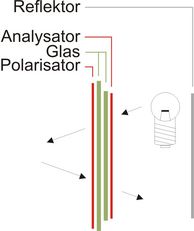
LCD is the abbreviation for liquid crystal display. A LCD basically consists of two glass plates with a special liquid between them. The special attribute of this liquid is that it rotates or “twists” the plane of polarized light. This effect is influenced by the creation of an electrical field. The glass plates are thus each coated with a very thin metallic film. To obtain polarized light, you apply a polarization foil, the polarizer, to the bottom glass plate. Another foil must be applied to the bottom glass plate, but this time with a plane of polarization twisted by 90°. This is referred to as the analyzer.
In the idle state, the liquid twists the plane of polarization of the incoming light by 90° so that it can pass the analyzer unhindered. The LCD is thus transparent. If a specific voltage is applied to the metallic film coating, the crystals rotate in the liquid. This twists the plane of polarization of the light by another 90°, for example: The analyzer prevents the light getting through, and the LCD thus becomes opaque.
Difference LCD to TFT and OLED
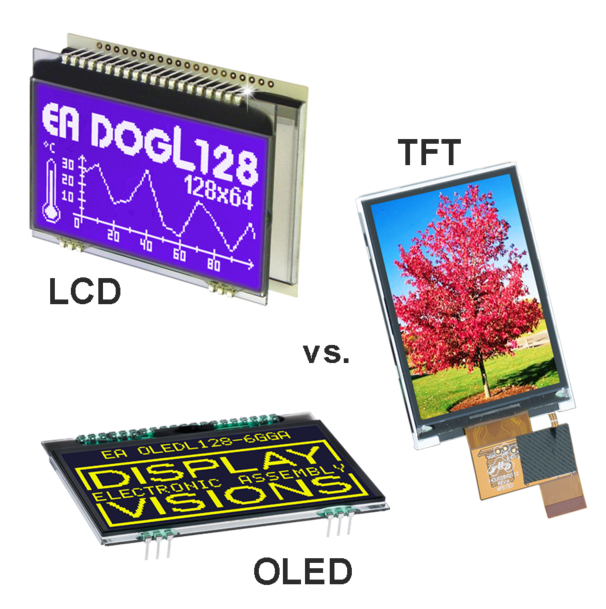
Many ask themselves, "What is the difference between an LCD display and a TFT-display?" or "What is the difference between a TFT and an OLED display?". Here are these 3 sometimes extremely different display technologies briefly explained. LCD vs. TFT vs. OLED (comparison).
- The LCD (Liquid Crystal Display) is a passive display technology. The operation and the structure are described above. Passive means that an LCD can only darken or let out light. So it always depends on ambient light or a backlight. This can be an advantage because the power consumption of a LCD display is very, very low. Sometimes even less than the accumulated power consumption of an E-paper display, which in static operation requires absolutely no energy to maintain the content. To change the contents, however, a relatively large amount of power is required for an E-paper display.
LCDs can also be reflective, so they reflect incident light and are therefore legible even at maximum brightness (sunlight, surgical lighting). Compared to TFT and also OLED, they have an unbeatable advantage in terms of readability and power consumption :; the "formula" is: Sunlight = LCD.
- A TFT-display (of Thin-Film Transistor) is usually a color display (RGB). From the construction and the technology it corresponds to the LCD. It is also passive, so it needs a backlight. This is in any case necessary except for a few, very expensive constructions. However, a TFT needs much more light than the monochrome relatives, because the additional structures on the glass as well as the additional color filters "swallow" light. So TFTs are not particularly energy-efficient, but can display in color and at the same time the resolution is much higher.
An advantage is certainly the much shorter response time for changing or moving images.
- OLED displays (by Organic-Light-Emitting-Diode) are as the name implies active displays - every pixel or sign generates light. This achieves an extremely wide viewing angle and high contrast values. The power consumption is dependent on the display content. Here OLEDs to TFTs and LCDs differ significantly, which have a nearly constant power consumption even with different display contents. Unfortunately, the efficiency of converting the electric current into light energy is still very poor. This means that the power consumption of OLEDs with normal content is sometimes higher than that of a TFT with the same size. Colored OLEDs are increasingly used in consumer devices, but for the industry, due to their availability and lifetime, currently only monochrome displays are suitable (usually in yellow color).
In the reaction time, the OLEDs beat each TFT and LCD by worlds. Trise and Tfall are about 10μs, which would correspond to a theoretical refresh rate of 50,000 Hz. Possibly an advantage in very special applications.
Which is better, LCD, OLED or TFT?
Finally, the question “Which is better, LCD, OLED or TFT?” or “What are the differences and what are the advantages of each?”
Due to the physical differences, it is not possible to give a general answer. Depending on the application, there are advantages and disadvantages to each individual technology. In addition to the differences mentioned above, there are many other details in the design and construction that need to be considered individually for each device.
Conclusion: There is no “better” technology, all 3 technologies have their advantages and disadvantages and accordingly their right to exist on the market.
Write us an e-mail or give us a call: we have specialists with 20 and 30 years of experience in some cases. We would be happy to compare different displays with you.
TN, STN, FSTN, blue mode, yellow-green mode
Liquids that twist the plane of polarized light by 90° are referred to as TN (Twisted Nematic). STN (Super Twisted Nematic) liquids twist the plane of polarized light by at least 180°. This gives the display improved contrast. However, this technology does color the display to a certain extent. The most common colors are referred to as yellow-green and blue mode. There is also a gray mode, which in practice is more blue than gray, however.
In order to counteract the undesired color effect, the FSTN technology uses an additional foil on the outer side, but this causes a loss of light and means that this technology is only effective with lit displays.
However, the different colors occur only in displays that are either not lit or that are lit with white light. If there is any color in the lighting (e.g. yellow-green LED lighting), it overrides the color of the display. A blue-mode LCD with yellow-green LED lighting will always appear yellow-green.
Static or multiplex driving method
Small displays with a small viewing area are generally statically driven. Static displays have the best contrast and the largest possible angle of view. The TN technology fulfills its purpose to the full here (black and white display, reasonably priced). The bigger displays get, however, the more lines become necessary in static operation (e.g. graphics 128x64=8192 segments =8192 lines). Since there is not enough space on either the display or a driver IC for so many lines, multiplexing is used. The display is thus divided up into rows and columns, and there is a segment at each intersection (128+64=192 lines). Scanning takes place row by row (64x, in other words a multiplex rate of 1:64). Because only 1 row is ever active at any one time, however, the contrast and the angle of view suffer the higher the multiplex rate becomes. This makes it essential to use STN.
Viewing angle 6°°/12°°
Every LCD has a preferred angle of view at which the contrast of the display is at its optimum. Most displays are produced for the 6°° angle of view, which is also known as the bottom view (BV). This angle corresponds to that of a pocket calculator that is lying flat on a desktop.
12°° displays (top view, TV) are best built into a table-top unit. All displays can be read vertically from the front.
Reflective, transflective, transmissive
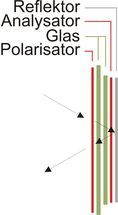
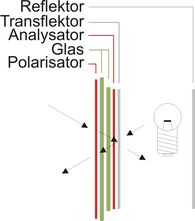
Reflective (unlit) displays have a 100% reflector on the rear side. Backlighting is thus not possible. Transflective displays have a semi-transparent reflector on the rear side. They can be read with or without lighting. When they are not lit, however, they are somewhat duller than a reflective version. Nevertheless, this is the best compromise for lit LCDs. Transmissive displays have no reflector at all. They can only be read with lighting, but they are very bright.
 |  |  |
|---|---|---|
| Reflective LCD | Transflective LCD | Transmissive LCD |
Positive/negative displays
Most displays are produced in positive mode. They can be recognized by their black characters on a light background. They are available with or without lighting. Negative displays have a dark background and illuminated characters. They can only be used effectively with lighting. Without lighting they cannot be read.
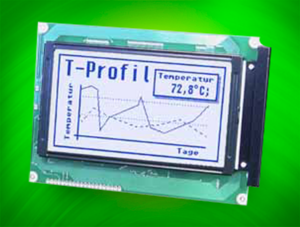 | 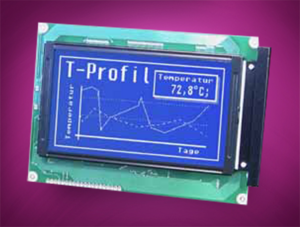 | ||
|---|---|---|---|
| Positive mode | Negative mode | ||
 | Normal display |  | Normal display |
 | Inverted by software |  | Inverted by software |
Lighting
LCDs without lighting are hard to imagine these days. However, since there are basically four different types of lighting, the type selected depends very much on the application. Here is a brief overview to clarify the situation:
| LED yellow/green | LED white | EL | CFL | |
| Advantages | - 5V= supply - Lifetime 100,000 hours - Very bright (light box) | - 5V= supply - Lifetime 5,000~20,000 hours*) - White light - Very bright | - Low-power - Very flat - Different colors available | - Extremely bright - White light |
| Disadvantages | - Green-yellow color - Uneven and not very bright as a light pipe | - Higher price | - EL inverter required - Lifetime 5,000-10,000 hours - Not very bright | - CFL inverter required - Lifetime 10,000-20,000 hours |
| Overall verdict | Straightforward | Ideal | Cost-effective | Powerful |
*) life time depends on ambient temperature and LED current
However, the lighting also determines the optical impression made by the display, and the display mode; blue or yellow-green – does not always have an influence. Below you can see the EAP162-3N display with different types of lighting by way of example:
| Lighting | |||
|---|---|---|---|
| LED yellow/green | EL blue | EL/LED white | |
| STN blue |  | 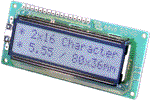 | 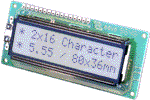 |
| STN yellow/green | 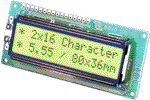 | 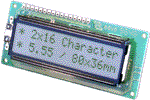 |  |
Temperature range, limits and destruction
Standard LCDs have a temperature range of 0 to +50°C. High-temperature displays are designed for operation in the range from -20 to +70°C. In this case, however, additional supply voltage is generally required. Since the contrast of any LCD is dependent on the temperature, a special temperature-compensation circuit is needed in order to use the entire temperature range, and this is particularly true for high-temperature displays (-20 to +70°C). Manual adjustment is possible but rather impractical for the user.
However, the storage temperature of a display should never be exceeded under any circumstances. An excessively high temperature can destroy the display very quickly. Direct exposure to the sun, for example, can destroy an LCD: This is because an LCD becomes darker (in positive mode) as it gets hotter. As it gets darker, it absorbs more light and converts it to heat. As a result, the display becomes even hotter and darker... In this way, temperatures of over 100°C can quickly be reached.
Dot-matrix, graphics and 7-segment displays
The first LCDs were 7-segment displays, and they are still found today in simple pocket calculators and digital watches. 7 segments allow all of the digits from 0 to 9 to be displayed.
Text displays require what is known as a dot matrix, an area consisting of 5x7=35 dots, in order to display all of the letters in the alphabet as well as various special characters. Graphics displays have a similar structure to text displays. In this case, however, there are no spaces between the lines and characters.
Display drivers and controllers
The semiconductor industry now offers a very large range of LCD drivers. We generally distinguish between pure display drivers without intelligence of their own, controllers with a display memory and possibly a character set, and micro-controllers with integrated LC drivers.
Pure display drivers work in a similar way to a shift register. They generally have a serial input. They require an external pulse, and in multiplex operation with high frequency they require new display data continuously in order to achieve a refresh frequency that is as high as possible (MSM5219, UPD7225, HD44100, LC7942, etc.). An example of a genuine controller is theHD44780 for dot-matrix displays: Once it has received the ASCII code, the controller manages its character set, memory and multiplexing entirely on its own. The following controllers are widely used for graphics displays: HD61202/3, HD61830, SED1520, SED1330, T6963.
All of the well-known uC manufacturers now offer one or more versions with integrated display drivers. They have their own display memory that can be accessed by command.
AACS and IPS technology
For TFT-displays the IPS technology widens the viewing angle compared to wide spread TN technology.
Once more the new AACS technology (All-Angle-Color-Stability) improves the color stability for different viewing angles. It's providing same color for 90° straight view as for 20° or 160° bottom or top view. There's no more color shift or inverting effect.
In addition to that readability is guaranteed even at very flat viewing angles - no comparsion to standard TFT-displays with TN cell.
Also at direct sunlight the AACS displays wins with its brillliant colors.
Here's a short video with 3 displays showing the difference:

© Dipl. Ing. Ralph Tischer - 05.2019
FAQ - Questions and Answers About Display Technologies: A Comparison
What are the main differences between LCD, TFT, and OLED displays?
Why are LCDs easy to read, especially in sunlight?
What are the advantages of OLED displays compared to TFT displays?
How does backlighting affect the power consumption of TFT displays?
Which display technology is the most energy-efficient?
Why is DISPLAY VISIONS the best choice for display technologies?

